Chocolate Bark: A Dessert-Themed Color Font for Designers
As someone who’s launched over 200 digital products across Etsy, Creative Fabrica, and Shopify — from SVG bundles to Canva templates and print-on-demand collections — I test every new graphic design asset with one question in mind: Will this help me sell more, faster, and with less revision? That’s why Chocolate Bark stood out immediately. This color font isn’t just another playful typeface — it’s a dessert-themed visual shortcut that delivers mood, theme, and instant recognition in a single glyph.
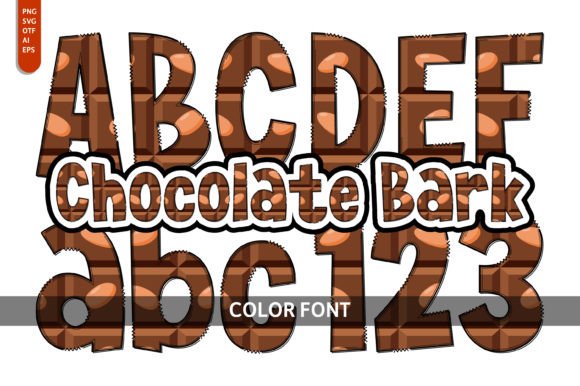
First impression? Warm, joyful, and unmistakably sweet — like walking into a boutique chocolate shop. The vibrant colors aren’t random; they’re baked into the letterforms themselves, with rich cocoa browns, creamy beiges, glossy reds, and soft pastel accents. It feels handmade but polished — festive without being childish, decorative without sacrificing readability at medium sizes. It leans feminine and celebratory, making it ideal for baby showers, bakery branding, Valentine’s Day collections, or spring-themed digital downloads. It’s not minimalist. It’s not corporate. It’s *deliberately delicious* — and that’s its strength.
Where Chocolate Bark Fits Real Product Workflows
I tested Chocolate Bark across six product categories I regularly publish: printable wall art, Cricut-ready SVG bundles, Canva invitation templates, sublimation mug designs, planner sticker sheets, and seasonal social media graphics. Here’s what worked — and where I paused.
- SVG & PNG designs: Works beautifully as a headline or focal point in layered SVG files — especially for bakery logos, gift tags, or “Sweet Treats” themed scrapbooking kits. Just remember: since it’s a color font, you’ll need to outline or rasterize before exporting for Cricut Design Space if using older software versions.
- Printable wall art & nursery prints: Paired with a clean sans serif (like Montserrat) for body text, Chocolate Bark instantly elevates a “Cocoa & Cozy” quote poster or baby milestone card. Its contrast holds up well on matte paper — but avoid ultra-thin fonts beneath it, as visual hierarchy gets muddy.
- Canva templates: Added it to a set of editable birthday party invitations. Buyers loved how easily it communicated theme — no extra clipart needed. Just drag, resize, and go. Bonus: it scales cleanly up to 300pt in Canva’s editor without pixelation.
- Sublimation & merchandise: Used it on mockups for mugs, tumblers, and tote bags. On light substrates, the colors pop. On dark backgrounds? I swapped to a white stroke version (easily done in Illustrator) — otherwise, some detail gets lost.
- Digital downloads & design bundles: Bundled it with coordinating chocolate-themed clipart (cocoa beans, wrappers, sprinkles) and included usage tips in the PDF guide. Customers reported higher perceived value — they weren’t just buying a font, but a cohesive visual language.
How It Strengthens Your Product Presentation
On Etsy, thumbnail clarity makes or breaks click-through. Chocolate Bark’s bold color blocking gives listings immediate shelf appeal — especially in seasonal searches like “Valentine’s font” or “dessert clipart bundle.” When used consistently across a collection (e.g., all product mockups feature the same “Hot Cocoa” header), it builds brand consistency even for small business branding without a formal logo.
It also supports visual storytelling. A planner sticker sheet titled “Bake Sale Planner” feels instantly thematic with Chocolate Bark headings — no extra illustration required. That saves time, reduces file bloat, and helps customers grasp your niche faster. In blog graphics or Pinterest pins, it boosts retention: people pause longer on warm, food-inspired typography than generic script fonts.
Where to Use Chocolate Bark Carefully
This isn’t a utility font — and that’s fine. Don’t force it into contexts where precision matters more than personality:
- Tiny sticker details: At under 24pt, the color gradients blur. Avoid using it for micro-stickers or QR code labels.
- Cricut/Silhouette cut files: If you’re selling SVGs meant for physical cutting, ensure the Chocolate Bark layers are either outlined (for solid shapes) or clearly labeled as “decorative only” — the built-in gradients won’t cut cleanly.
- Text-heavy layouts: Never use it for paragraphs, pricing tables, or ingredient lists. It’s a display font — best reserved for headlines, banners, and short callouts.
- Low-contrast backgrounds: Test on both white and charcoal mockups. Some lighter tones fade on cream or kraft paper — adjust opacity or add subtle drop shadows if needed.
Practical Seller Notes Before You List
Before publishing any product featuring Chocolate Bark, I run this checklist:
- Preview the font in real product mockups — not just on-screen, but printed at 300 DPI on your target paper stock.
- Check thumbnail visibility: shrink the listing image to 200px wide. Does the font still read as “chocolate” or just “blobby color”?
- Verify transparency on PNG exports — especially if layering over photos or textured backgrounds.
- Test SVG export fidelity in both Illustrator and Inkscape. Confirm no stray anchor points or ungrouped color layers.
- Review the commercial license carefully: Chocolate Bark includes full commercial rights, but always double-check whether redistribution (e.g., bundling in a Canva template sold on Etsy) is permitted — it is, but only when the font remains embedded, not extracted.
- Organize files thoughtfully: include a “Pairing Guide” PDF suggesting complementary fonts (a crisp serif for captions, a relaxed handwritten font for quotes, a sturdy sans for disclaimers).
This color font with a dessert theme is a delightful and captivating choice for anyone looking to bring joy and deliciousness into their designs — but only when matched to the right product, audience, and execution. Chocolate Bark won’t replace your workhorse sans serif, but it will make your next holiday bundle, bakery-themed Canva template, or printable greeting card feel more intentional, more memorable, and more market-ready. For digital product creators who sell SVG design, PNG design, clipart, sublimation design, or social media graphics, it’s less of a “nice-to-have” and more of a strategic visual asset — one that turns casual browsers into confident buyers.