Maxly: A Bold Color Fonts Choice for Playful Branding
First Impressions: Joyful, Unapologetic, and Instantly Recognizable
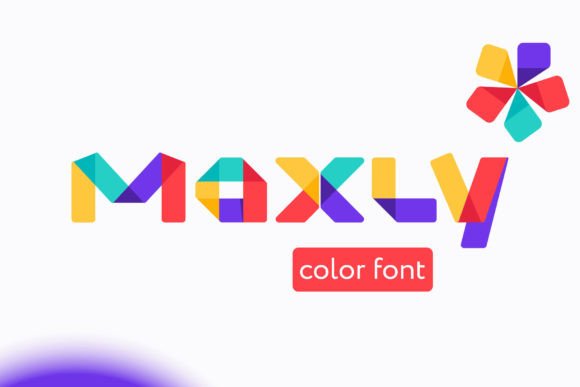
When I opened Maxly in Glyphs and typed “SUNSHINE” at 120pt, my client’s seasonal greeting card concept clicked into place. Maxly is a fun and bold display color font — not just colorful, but *chromatically intentional*. Each glyph pulses with layered gradients, soft shadows, and subtle texture that feels hand-painted yet digitally precise. It’s the kind of graphic design asset that lands before the viewer reads the word — it sets mood first, message second. This isn’t a neutral typeface. It’s an emotional amplifier. For handmade businesses, boutique product lines, or local event branding (think farmers’ market pop-ups, indie book fairs, or summer camp merch), Maxly delivers instant warmth and approachability.
Where Maxly Shines in Real Client Projects
I recently used Maxly to refresh packaging design for a small-batch candle brand launching a citrus-scented summer collection. We applied it to front-label hero text, sticker design for jar seals, and Instagram post banners — all within the same visual system. Its Opentype-SVG format rendered flawlessly across Adobe Illustrator, Canva templates, and Cricut Design Space (with SVG export). In product mockups, Maxly elevated otherwise simple layouts: on matte kraft boxes, its vibrant fills popped without ink bleed; on glossy tote bags, the gradients retained depth and dimension. It also performed beautifully in printable design contexts — from PDF invitations with spot-color separation to sublimation design files for mugs and tumblers.
- Logo design: Works best as a secondary logo or wordmark accent — never for tiny favicons or app icons.
- Social media graphics: Dominates Pinterest pins and Instagram Stories where boldness cuts through feed noise.
- Crafting & Cricut projects: The SVG output is clean, scalable, and layer-friendly for vinyl cutting or print-and-cut workflows.
- Print-on-demand assets: Renders crisply at 300dpi on t-shirt design mockups, especially over light or mid-tone backgrounds.
- Editorial & web design: Ideal for hero headers, section dividers, or campaign-specific banners — not body copy or navigation menus.
Where to Use Maxly With Intention — Not Just Enthusiasm
Maxly is not a universal solution. Its strength lies in contrast, so it struggles where subtlety rules. I tested it for a law firm’s newsletter header — the result felt jarring, undermining visual trust. Similarly, on complex backgrounds (e.g., busy pattern overlays or photo collages), the color layers compete instead of complement. Avoid Maxly in minimalist branding systems, corporate presentations, or any context demanding strict typographic hierarchy. It also loses legibility below 24pt, especially in all-caps settings, and can overwhelm small layout areas like business card footers or QR code labels. For Etsy product listings, use it only in primary visuals — never in thumbnail-only contexts where detail vanishes.
Design Judgment in Action: What I Tested Before Approving It
Before locking Maxly into the candle brand’s final files, I ran six practical checks:
- Black-and-white conversion: Confirmed glyphs remain legible as outlines — critical if a client needs monochrome versions for embossing or laser engraving.
- Background contrast: Previewed on light, dark, and gradient backgrounds. Maxly’s built-in shadows ensure readability on white, but it fades on near-black unless manually adjusted.
- Scale responsiveness: Checked at 16pt (too fuzzy), 48pt (clear), and 200pt (exquisitely detailed) — confirming it’s strictly a display font.
- Mockup realism: Placed it on real product mockups (not flat PSDs) — verified how lighting affects perceived saturation on ceramic mugs vs. cotton tees.
- File integrity: Verified the Opentype-SVG contains no embedded raster elements and retains vector editability in Illustrator.
- Licensing clarity: Confirmed commercial license covers both digital product distribution (Canva templates, SVG design bundles) and physical goods (sticker packs, print-on-demand).
How Maxly Fits Into the Broader Design Ecosystem
Compared to serif fonts (too formal), sans serifs (too neutral), or script fonts (too fragile), Maxly occupies a rare niche: high-energy display typography with built-in personality. It doesn’t need supporting illustrations — it *is* the illustration. When paired with a clean sans-serif for body copy (like Inter or Poppins), it creates compelling visual hierarchy without visual clutter. For creative marketplace sellers, bundling Maxly with coordinating PNG design elements or clipart enhances perceived value. And for bloggers or content creators building branded printable design kits, Maxly adds instant cohesion across wall art, planners, and social media quote graphics.
A Final Note on Professional Fit
Maxly won’t solve every branding challenge — but for the right project, it solves the hardest one: making joyful feel intentional. It signals creativity without sacrificing polish, playfulness without seeming unserious. If your client’s voice is warm, human-centered, and visually expressive — whether they’re launching an Etsy shop, designing festival merch, or building a seasonal marketing campaign — Maxly earns its place in your toolkit. Just remember: it’s a spotlight, not a stage light. Use it where it can command attention, not where it must share it.